If you’re just joining: #1 was the prototype, #2 was the glow-up, #3 was multiplayer going live, #4 was mounts and consumables, #5 was accounts and the economy, and #6 was monsters and traps.
Last time I ended on “is this the last devlog? Maybe. Maybe not.” Turns out: not.
Here’s the thing. I’m going away for a few days, and I wanted to play my own game while I’m out — on my phone, against an opponent that doesn’t require a second human sitting next to me. The game was desktop-only and the bots’ favourite move was suicide. Neither of those survives contact with a trip.
So this devlog is a packing list: make it playable on a phone, and make the bots a real opponent. Have bombs, will travel.
Mobile, or: I want to play this on my phone
The client was built desktop-only. Zero responsive breakpoints, mouse-and-keyboard everything, a layout that assumed a 1080p window and a person sitting at a desk. Phones were not invited.
First decision: landscape-only, whole app. The arena is near-square (15×13 tiles), the menus needed reflowing anyway, and designing for one orientation is half the work of designing for two. Portrait gets a full-screen “rotate your phone” overlay and nothing else. I’m not building two layouts for a game you hold sideways.
Then I did the obvious mobile-web thing, which was a mistake, which is the interesting part.
I built a PWA. The pitch writes itself: installable to the home screen, and — crucially — a web app manifest can request orientation: landscape, which Android actually honours for installed PWAs. Real orientation lock! On the open web! I added the manifest, a service worker, the icons, the install prompt. Shipped it. Felt very professional.
Then I used it, and counted what it actually bought me:
- iOS ignores manifest orientation entirely. Even installed to the home screen, Safari does not care about your
orientation: landscape. And “play in a cafe on an iPhone” is the exact use case I was building for. - No offline story. This is a server-authoritative realtime multiplayer game. There is nothing to play offline. The service worker precached nothing — it existed purely to satisfy the “installable” checkbox. A service worker that caches nothing is just overhead with a certificate.
- Install friction to unlock a feature that only worked on one platform, where the soft fallback worked fine anyway.
So I ripped it out. The whole thing — vite-plugin-pwa, the manifest, the worker, the icons — gone. I kept the two pieces that actually did something without it: the rotate overlay (works everywhere), and a little fullscreen button that uses the browser’s Fullscreen API to reclaim the address-bar space and, on Chromium, do a best-effort orientation lock. That’s it. That’s the whole mobile-shell story: I cargo-culted “mobile web means PWA,” shipped a manifest cosplaying as an app, and then deleted it. Present Hoang is wiser. Past Hoang had a fun afternoon.
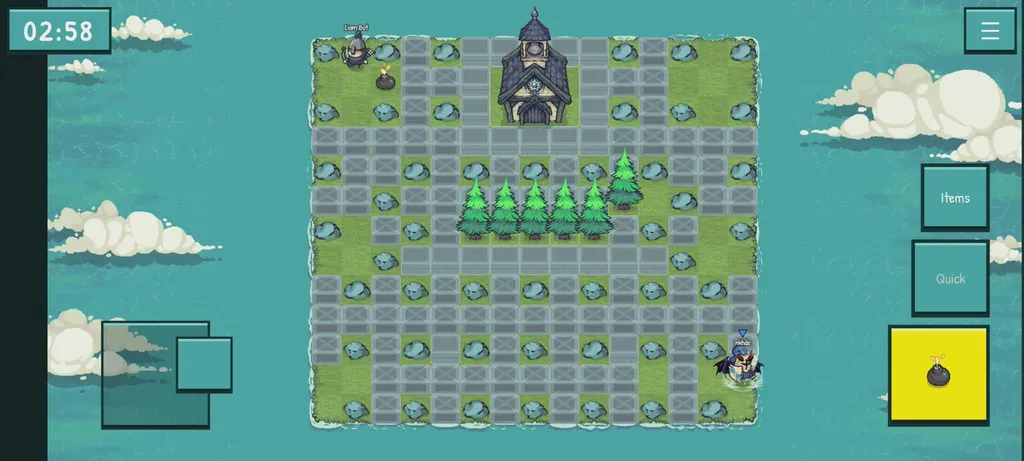
The controls themselves are a floating virtual joystick in the left band and Bomb / Quick-item buttons in the right band — one thumb per side. The joystick has a trailing base: when your thumb pulls past the throw radius, the base chases after it, so changing direction is a short flick at the edge instead of a long drag back across a dead centre that would momentarily stop you.
And it only emits four directions — up, down, left, right — because the game has no diagonal movement. The server moves you on a single axis at a time, full stop. So the joystick is a pure input skin: it reads your thumb, quantises to the nearest cardinal, and presses the same four arrow keys a keyboard would. Touch isn’t a special movement mode. It’s just a thumb pretending to be arrow keys.
Which is great, until you try to turn a corner.
The corner problem
Here’s the bug that drove me up a wall — literally.
Picture a vertical wall, three tiles tall. You’re running down alongside it, and you want to round the bottom and head right. So your thumb sweeps from down toward right. Natural motion, one fluid arc.
The joystick is watching the thumb angle, and the instant the rightward component edges past the downward one, it switches the input to “right” — while you are still a full tile above the corner, with the wall still on your right. Right is blocked. You stop. You’re stuck on the wall, half a tile short of the turn you were clearly trying to make. Every single time.
The lazy fix is 8-way movement: let the thumb go diagonal, let the character go diagonal. I said no. Diagonals would mean changing the shared movement model — the thing the server, the bots, the prediction, and every existing player all agree on — to fix a thumb ergonomics problem. That’s not a control tweak, that’s a different game. Hard no.
The real fix leans on something the client already does: it predicts your position locally (that’s its own whole deep-dive), running the exact same movement-and-collision code the server runs. Which means the client already knows, this very frame, whether “right” is walled.
So: collision-aware turn buffering. New rule for the touch input — if the joystick says “right” but right is blocked, and the direction you were already moving (“down”) is still open, keep sending down. Hold it until right opens up, and the moment it does, turn. The joystick says right; the client quietly sends down; you clear the corner; it turns right on its own. From your thumb’s point of view, you just held the stick toward where you wanted to go and the character flowed around the corner like it had a brain.
Still single-axis. Still no diagonals. Zero change to the server, the simulation, or the bots — it’s a few lines in the client’s input layer, gated to touch only (keyboard players can time their own turns, thanks). The “is right open?” check runs one step of the real movement function against a throwaway copy of your predicted position, corner-alignment and all, so the turn releases at exactly the frame a real step would land — no overshoot, no hitch.
It’s the smallest possible change that makes the joystick feel like it understands walls. My favourite kind of fix.
Bots that stop killing themselves
Now the bots. Because playing alone on a train means playing against the AI, and the AI had a problem: its leading cause of death was itself.
Not me. Not other bots. Its own bombs. Two signature moves:
- The dead-end. Place a bomb, then confidently stroll into a one-tile pocket with no exit and stand there, vibrating slightly, until its own bomb goes off.
- The half-tile shuffle. Flee to a safe tile — and then, because the game moves in sub-cells but tracks danger per tile, jitter back and forth across the tile boundary and clip into its own blast on the recoil. Killed by a rounding error and indecision.
The old logic was the culprit. A bot picked an escape direction, cached it, and walked blindly in that direction between its (throttled) AI ticks. If the escape needed a turn, it walked into a wall. If it reached safety, it immediately got bored and wandered back toward the action — and the action was the bomb it just placed.
The fix is a committed flee-plan. When a bot drops a bomb, it computes the entire escape route up front — not just the first step — stores it, and follows it tile by tile, every tick, turns and all. And it holds at safety until the blast has fully cleared, instead of declaring itself safe the instant it technically is and moonwalking back into the fire. Less panicked chicken; more “places bomb, leaves the room, waits, comes back.”
I was pretty sure that fixed it. “Pretty sure” is not a test.
So I wrote a fuzz harness: drop a bot on a random map, let it bomb itself silly for a few thousand ticks, and assert — every tick — that it never dies to its own bomb. I ran fifty random maps. It immediately found two more ways to commit suicide that I hadn’t even imagined:
- The double-bomb box. The bot would place a second bomb whose blast sealed off the escape from the first. Its safety check had cheerfully assumed it could out-run the first bomb’s countdown — which a slow bot cannot. Fix: when checking whether a placement is survivable, treat every existing blast as a solid wall. The only blast you’re allowed to walk through on the way out is your own fresh one.
- Walking into the fire. When genuinely boxed in with no safe tile, the “best-effort, do something” fallback would happily step into an active explosion. Fix: never voluntarily walk into a live blast. If you’re trapped, hold, and hope the chain clears.
I bumped the fuzz up to 120 maps across varied bomb counts, blast ranges, and movement speeds. Zero self-kills. The bots are now, provably, worse at killing themselves than I am.
(There was also a bonus bug, which the fuzz did not catch — I did, by playing. A fleeing bot shoved off its route by a push trap could end up moving diagonally for a frame, which made it travel √2 times its own speed. A bot quietly speed-hacking. Clamped to single-axis; the bots respect the speed limit again.)
The upshot, and the whole point: when I’ve got my phone and nobody to play with, the bots are an actual opponent now. They pressure you, drop bombs in your face, corner you, and no longer hand you rounds by exploding themselves out of the match. Mostly.
In summary
Mobile: a landscape-only layout, a rotate overlay, a thumb-friendly joystick that turns corners on its own, and a PWA I’m genuinely glad I deleted. Bots: a committed flee-plan, a fuzz harness that found the bugs I was too optimistic to imagine, and an AI that no longer treats its own bombs as the primary threat.
Devlog #6 asked whether it was the last one. It wasn’t. But I’m about to be away for a few days, playing my own Bomberman clone on my phone, against bots I taught not to die. If that’s not a destination, it’s at least a good place to stop and take a photo.
Back in a few days. The bots will hold down the fort.
This work is part of Medieval Boom, a multiplayer Bomberman clone I’ve been building. The full devlog series starts with devlog #1.